
1

HongLeong Bank Logo
  • Priority
  • Islamic
  • Global Markets
  • Assurance
HongLeong Bank Logo
  • dropdown-menu-item singapore
  • dropdown-menu-item hong kong
  • dropdown-menu-item vietnam
  • dropdown-menu-item cambodia
  • ENG
  • Personal / Sole Proprietor
  • Business
    • HLB ConnectFirst
    • HL Connect Biz
    • HLB ConnectPro
Priority Islamic Global Markets Assurance
  • Our Story
  • News & Updates
  • Investor Relations
  • Sustainability
  • Awards
  • Management & BODs
  • Career
  • CSR
  • HLB Wallet
  • Debit Cards
  • Credit Cards
  • Loans
  • Bank Account
  • Insurance
  • Investment
  • Remittance & Foreign Currency
  • Multi-Currency Account
  • HLB Connect
  • Safe Deposit Box
  • Digital Solutions
  • Fixed Deposit
  • Links on HLB Connect
  • Credit Card
  • Personal Loan
  • Current / Savings Account
  • Complete Saved Application
  • Upload Documents
  • Track My Application
  • e-Invoice
PROMOTIONS
TRACK MY APPLICATION
/content/dam/hlb/my/images/HL_Connect/Connect/connect-logo-search.png
header-countries-mobile-item
Priority Islamic Global Markets Assurance
mobile-subheader-item singapore mobile-subheader-item hong kong mobile-subheader-item vietnam mobile-subheader-item cambodia
ENG
Suggested Searches:
Quick Link:
HLB Wallet Open Bank Account Credit Card Application Personal Loan Application
ABOUT US
Our Story News & Updates Investor Relations Sustainability Awards Management & BODs Career CSR
DISCOVER OUR PRODUCTS
HLB Wallet Debit Cards Credit Cards Loans Bank Account Insurance Investment Remittance & Foreign Currency Multi-Currency Account HLB Connect Safe Deposit Box Digital Solutions Fixed Deposit Links on HLB Connect
APPLY ONLINE
Credit Card Personal Loan Current / Savings Account Complete Saved Application Upload Documents Track My Application e-Invoice
PROMOTIONS
TRACK MY APPLICATION

No Result

Filter by Banking Category:
All Priority Islamic Global Markets
Filter by Type:
All Products Documents Tools Promotions News Help & Support Others

We have found 0 items that match what you searched for.

Popular Searches

Login to HLB Connect
Forgot HLB Connect Username / Password
Credit Cards
Personal Loan
Deposits
Promotions
Help & Support
Branch Locator
Contact Us
SHOW MORE

SHOW MORE
Online Banking and Mobile Banking App | HLB Connect >

UnionPay QR Service (Hidden Test)

Compare Cards ()
Apply Now
Scan & Pay all over China with HLB Connect App Scan & Pay all over China with HLB Connect App

Scan & Pay all over China with
HLB Connect App

Pay over 120 million merchants with zero transaction fees and great exchange rates.

Xinjiang

Pay smarter with QR Pay on HLB Connect App

Now available in China (including Hong Kong & Macau) and Thailand.
Wide Acceptance
Widest Acceptance

Pay seamlessly to over 120 million merchants, from local street food stalls to major retail stores.
Zero Transaction Fees

Enjoy zero transaction fees on all amounts.
No Top Ups Required
No Top-Ups Required

Pay directly from your HLB bank account/-i.
Seamless Currency Conversion

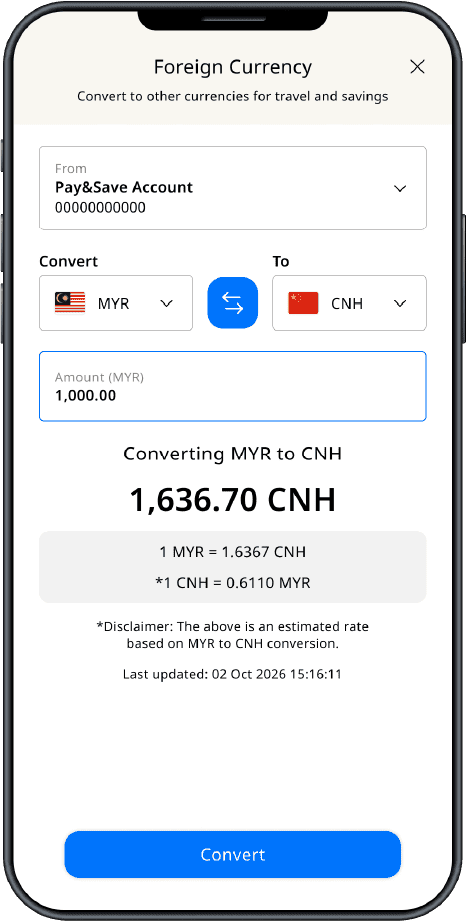
Convert MYR to CNH* anytime on HLB Connect App with your Pay&Save Account/-i to lock in favourable rates ahead of time.


*Offshore Chinese Yuan

Bank-Grade Security
Bank-Grade Security

Spend confidently backed by bank-grade encryption and 24/7 fraud protection, keeping your money safer than non-banking apps.

How to get started?

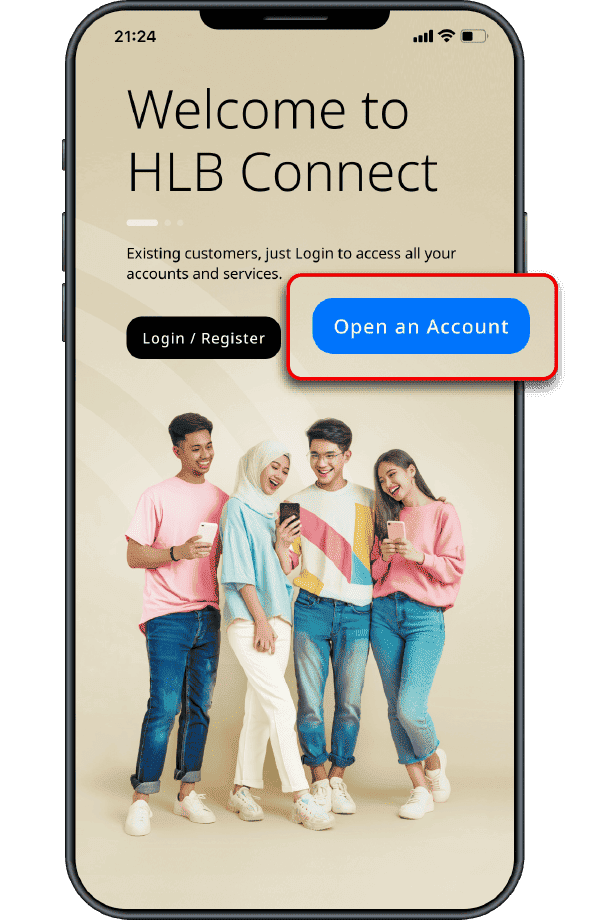
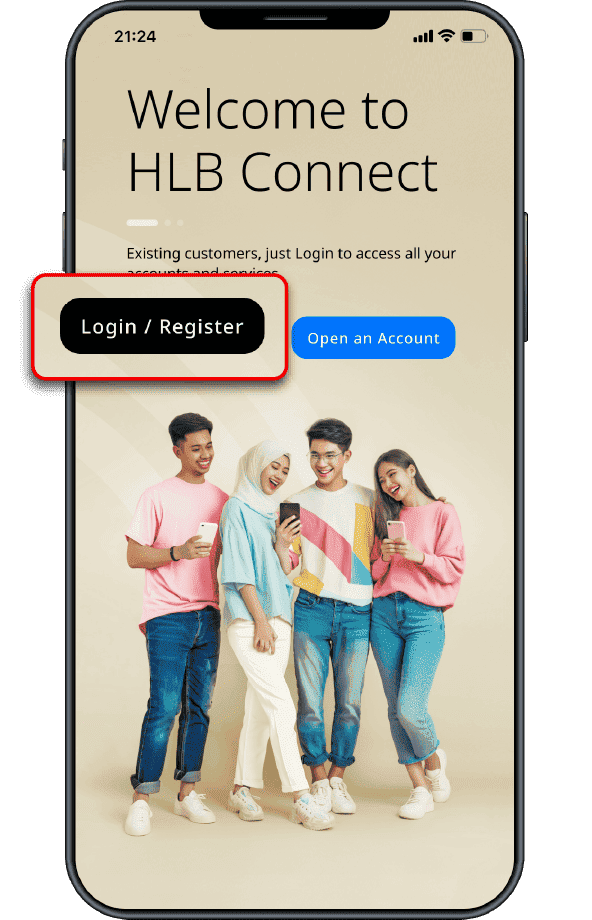
Download & open the HLB Connect App
For New Customers:
Tap on 'Open an Account' to apply for an HLB Pay&Save Account/-i
For Existing Customers:
Tap on 'Login/Register' to set up or log in to HLB Connect App
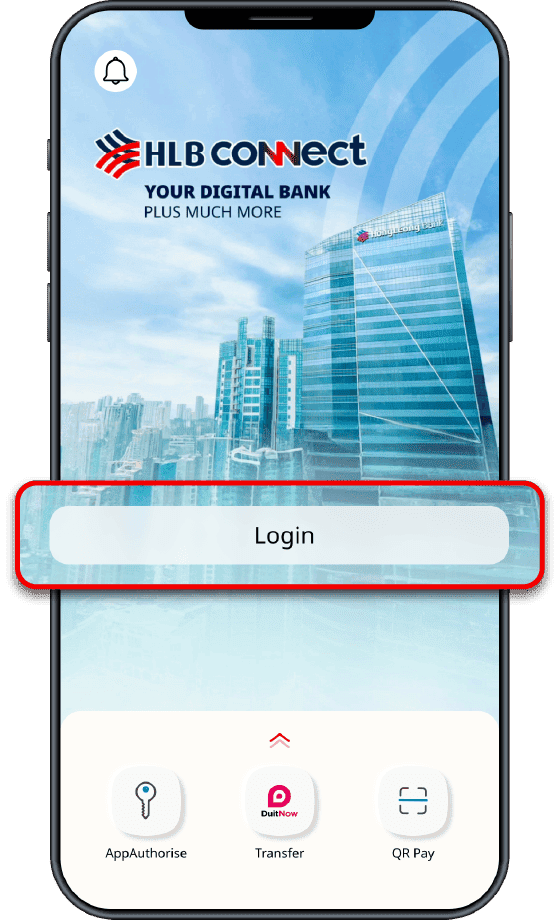
Login to HLB Connect App
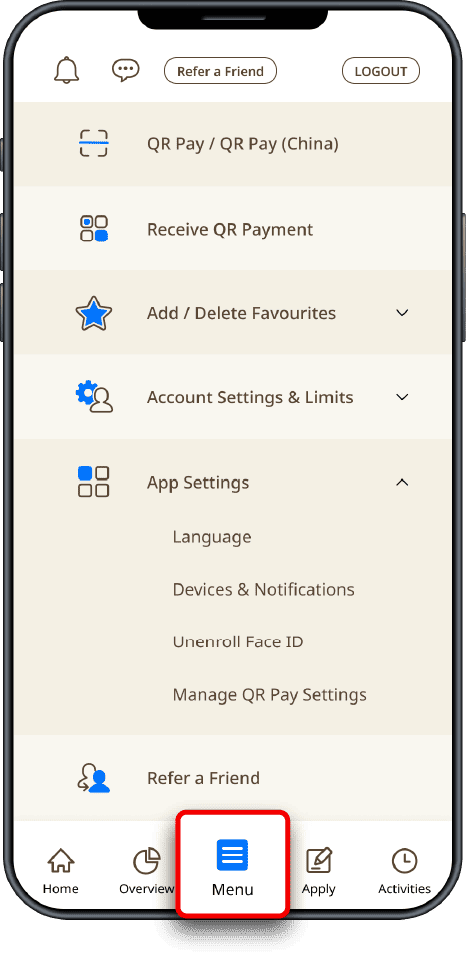
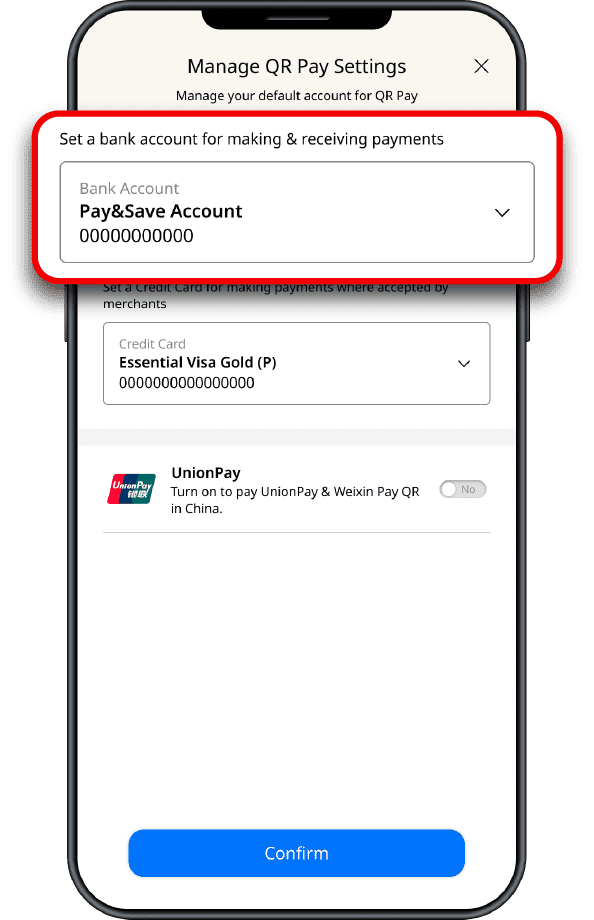
  • Tap on 'Menu'
  • Tap on 'App Settings'
  • Tap on 'Manage QR Pay Settings'
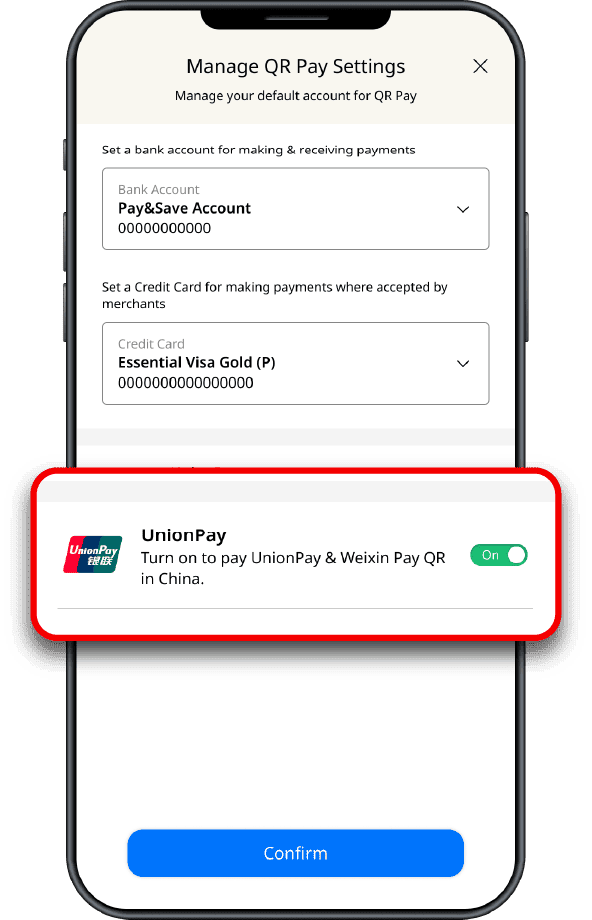
Set 'Pay&Save Account' or preferred account for QR Payment
Turn on 'UnionPay'

Multi-Currency Feature is only available for Pay&Save Account/-i & HLB Wallet/-i

Currency Conversion:
  • Tap on 'Menu'
  • Tap on 'Foreign Currency Deposit'
  • Select CNH under the 'To' dropdown menu. Enter the RM value to be converted to CNH
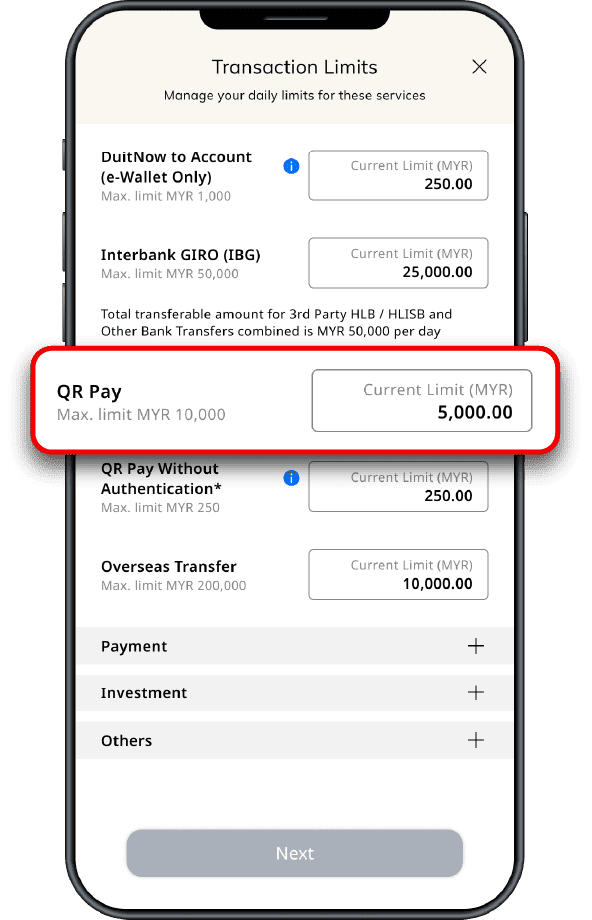
QR Pay Limit Setting:
  • Tap on 'Menu'
  • Tap on 'Account Settings & Limits'
  • Tap on 'Transaction Limits'
  • Tap on 'Transfer'
  • Tap on 'QR Pay' to set your preferred limit which has to be the same with Bill Payment limit
Get Started Step 01 Get Started Step 02 Get Started Step 03
Enable UnionPay QR Step 1 Enable UnionPay QR Step 2 Enable UnionPay QR Step 3 Enable UnionPay QR Step 4 Enable UnionPay QR Step 5 Enable UnionPay QR Step 6
ETB Overseas Setting 1 ETB Overseas Setting 2

Two ways to QR Pay with HLB Connect App

UnionPay, Weixin Pay logos
1
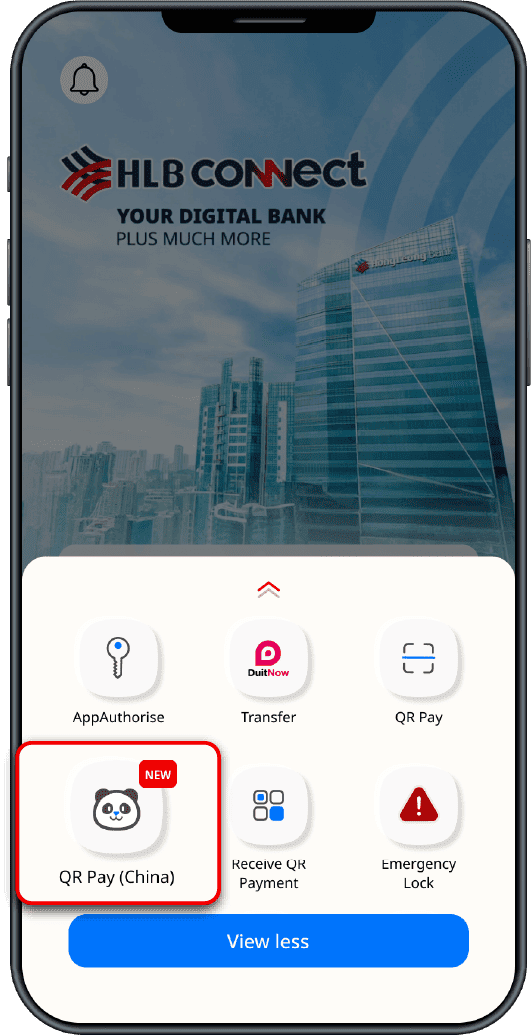
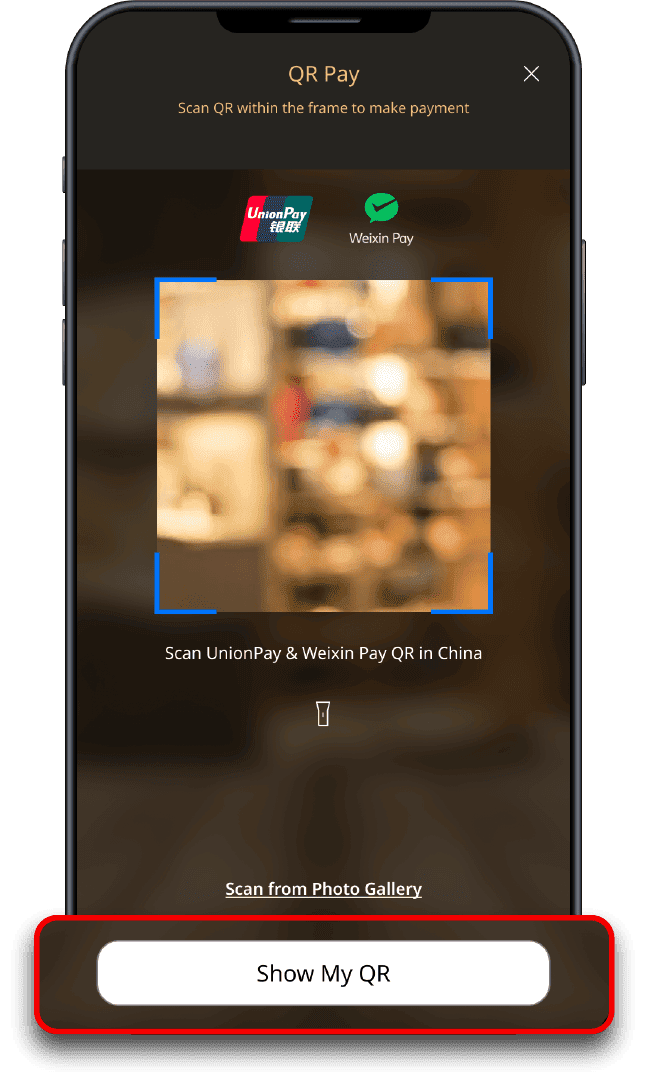
Launch HLB Connect App. Swipe up and tap on 'QR Pay (China)'
2
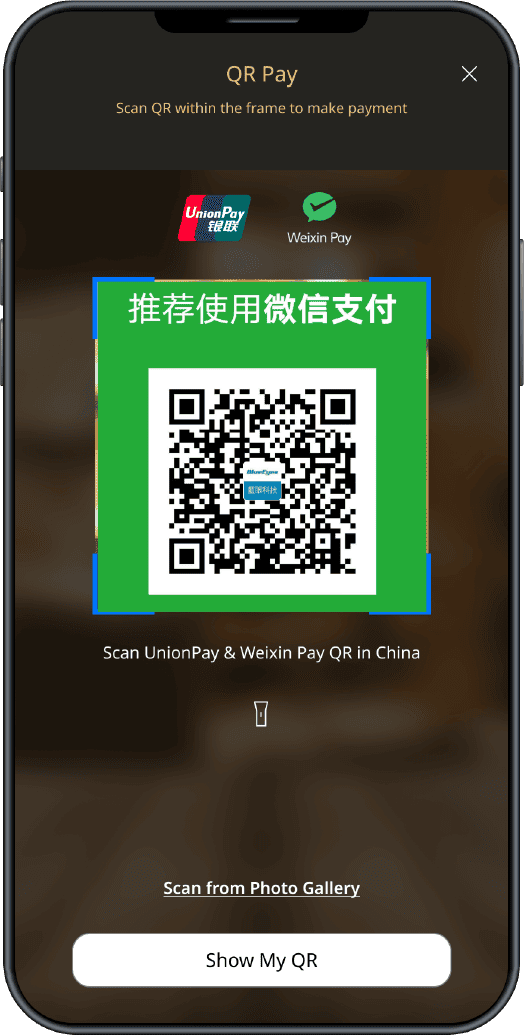
Scan merchant’s UnionPay or Weixin Pay QR codes
3
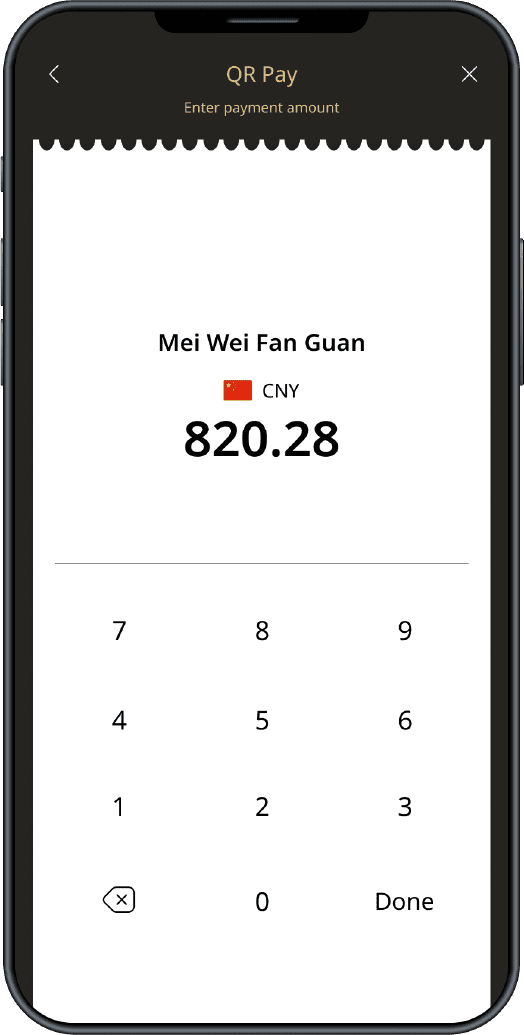
Ensure the amount matches the merchant’s screen or enter the amount manually
4
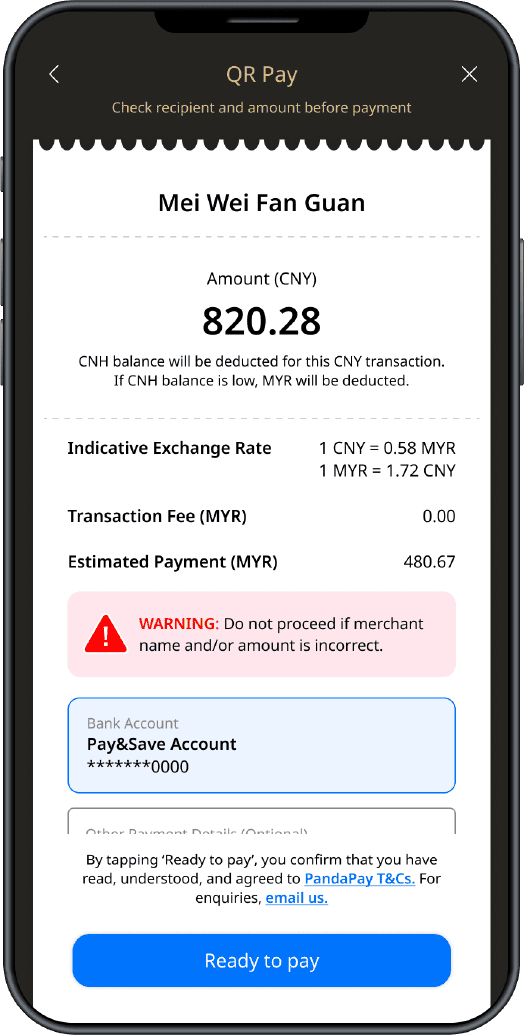
Once you've ensured the merchant name is correct, tap 'Ready to pay'
5
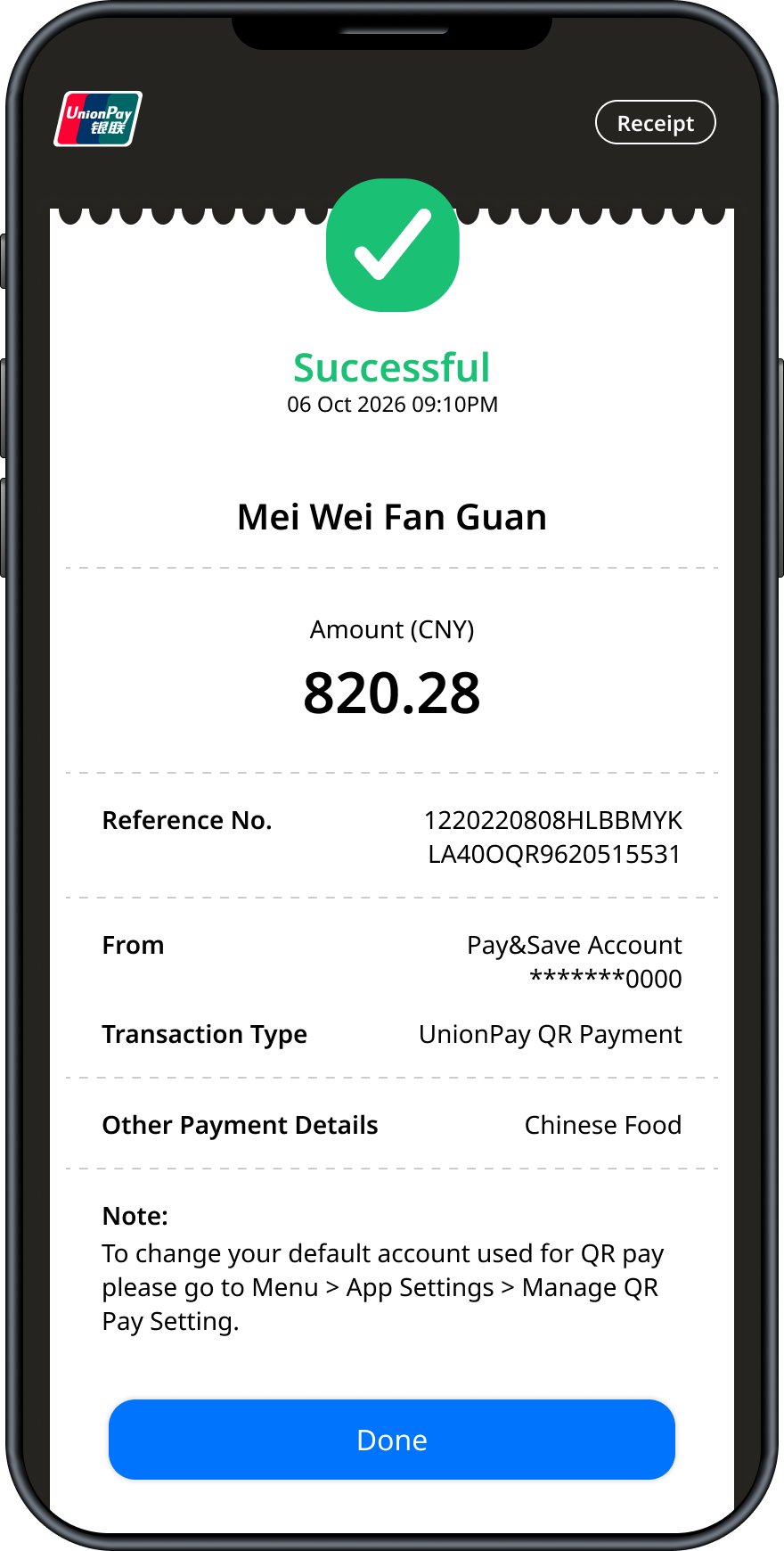
Payment successful! Enjoy your purchase
1
Launch HLB Connect App. Swipe up and tap on 'QR Pay (China)'
2
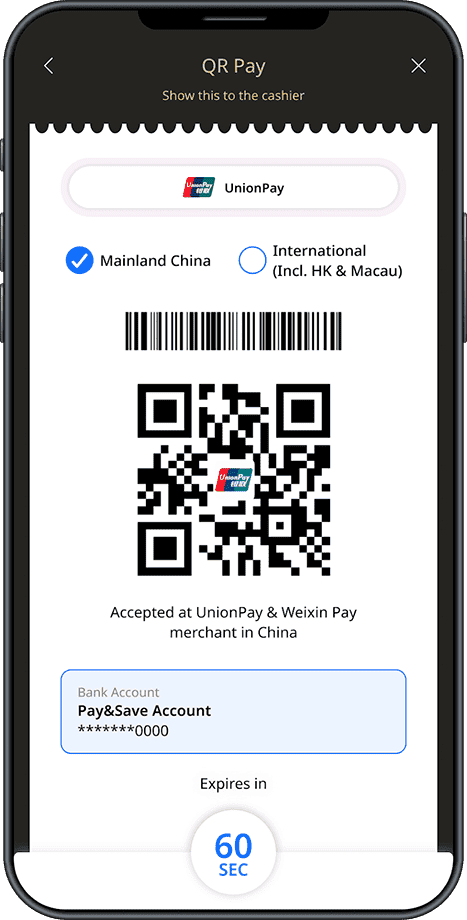
Tap on 'Pay in China with my QR'
3
Show Your QR Code for the merchant scan
4
Once you've ensured the merchant name is correct, tap 'Ready to pay'
5
Payment successful! Enjoy your purchase
Scan QR Step 1 Scan QR Step 2 Scan QR Step 3 Scan QR Step 4 Scan QR Step 5
Show QR Step 1 Show QR Step 2 Show QR Step 3 Show QR Step 4 Show QR Step 5

Scan these merchant QR displays showing UnionPay or Weixin Pay logo with HLB Connect App to pay
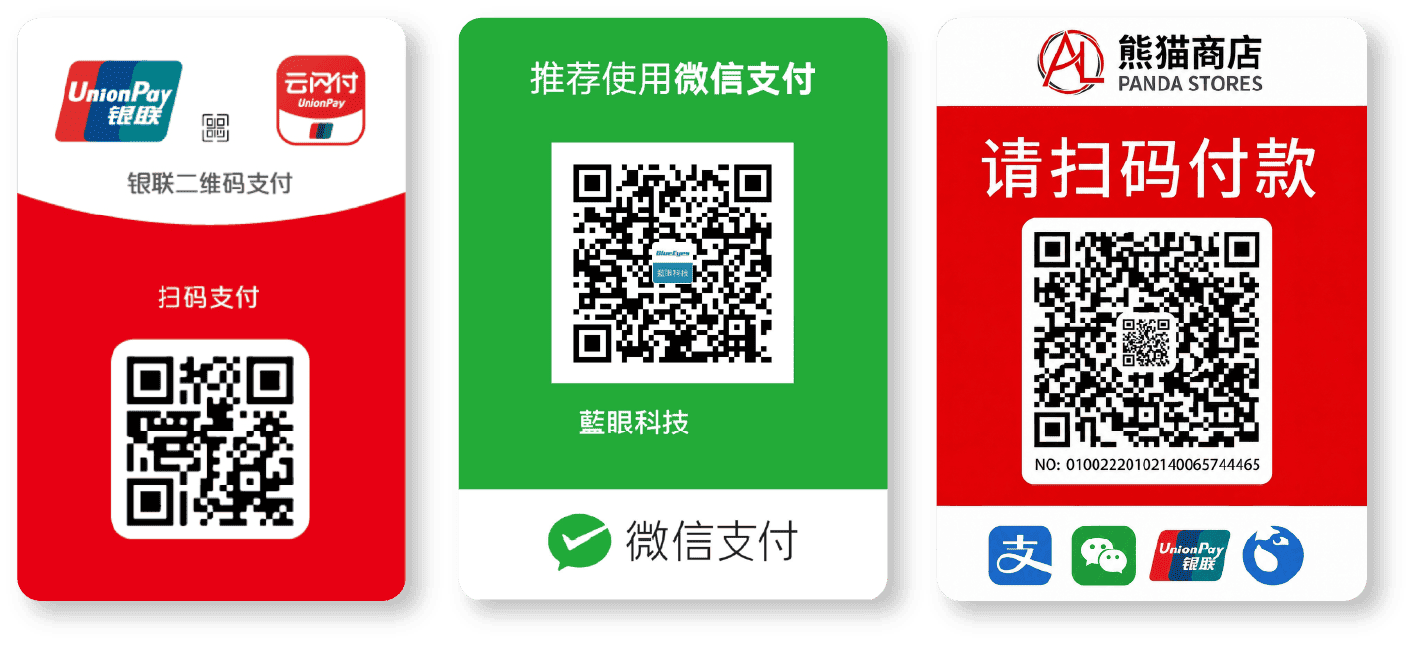
Correct QR Signages

Frequently Asked Questions

You can easily make QR payments in China (including Macau and Hong Kong) with your multi-currency HLB Pay&Save Account/-i via the HLB Connect App. Simply convert your funds to Chinese Yuan (CNH) via the app and scan to pay with UnionPay or Weixin QR codes.

You don’t have to go to the branch to open a Pay&Save Account/-i. HLB offers a fully digital account opening process through the HLB Connect App. You can open your HLB Pay&Save Account/-i from anywhere, at any time.

Yes. The HLB Pay&Save Account/-i is a multi-currency account that allows you to hold and transact up to 21 foreign currencies, including Chinese Yuan (CNH), making it perfect for your travels.

Yes, you can use HLB Connect App to make QR payments with UnionPay and Weixin QR codes in China.

You can get your HLB Pay&Save Account/-i within minutes when you open via HLB Connect App. In rare cases, if there’s any issue with the verification, the processing might take up to 3 days before you get your account.

HLB Connect App and HLB Pay&Save Account/-i are the best companions for your travels. You can instantly convert currencies within HLB Connect App and hold up to 21 foreign currencies within one HLB Pay&Save Account/-i.

View More

Terms and Conditions apply.

Important Notes:

Retail purchase transactions and other payments conducted in China will be settled in CNH.

If you do not have sufficient CNH balance in your multi-currency account to complete a transaction, the transaction will be charged in MYR.

For transactions in other currencies, the entire transaction amount shall be charged in MYR unless you have sufficient balance in your multi-currency account for the specific currencies.

Member of PIDM. HLB/HLB Islamic Valid Bank Accounts or Deposits/-i Accounts are protected by PIDM up to RM250,000 for each depositor (refer to Products Eligible for PIDM Protection).

Open
an account
Mobile phone displaying HLB Connect App Animated Panda character
HLB Connect App

Scan and Pay all over China

Supported by

UnionPay, Weixin Pay logos

Open an account on HLB Connect

QR code to open an account on HLB Connect
Mobile Landscape cover


Edit here to enter details for document download
ENTER THE DETAIL BELOW FOR SUBTITLE COMPONENT

Edit here to enter details for productdetail page promotion
Edit here to enter details for contact us

External Link Disclaimer

You are leaving Hong Leong Bank's website as such our Privacy Notice shall cease. We wish to remind you on our terms on the use of links, Disclaimer and Reservation of Intellectual Property Rights.

Continue